Physicians
Clinic website design and development: sites patients can use, and Colleges can read
Many clinic sites we are asked to look at fail at the basics: patients cannot find the hours, do not know whether the clinic is accepting patients, and cannot book without phoning. Many also carry claims a College of Physicians would question. We shape clinic sites around the four things a patient wants to do, and we write every page to your College's standard.
Our work
A clinic site that is running now
NovaMed Medical Clinic, Burnaby, British Columbia
Twenty one pages covering each service a physician here provides, with the two things patients most often cannot find anywhere else published in full.
- A published fee schedule for services that are not publicly insured, rather than a number quoted on request
- A patient facing notice explaining the clinic's use of AI assisted documentation, which is unusual for a practice this size
- A separate consent page for electronic communication
- A service page for each line of care, from walk in to chronic disease
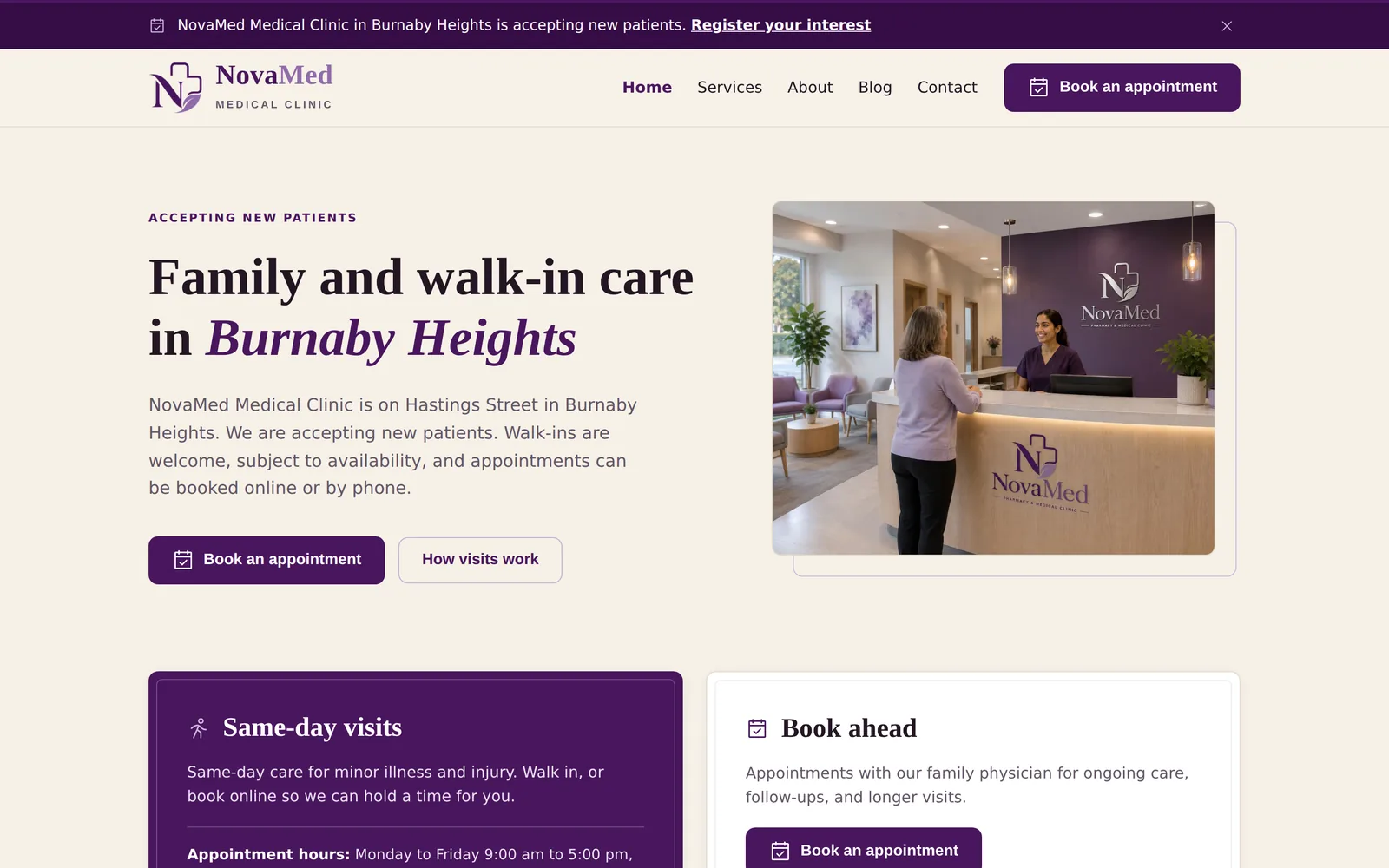
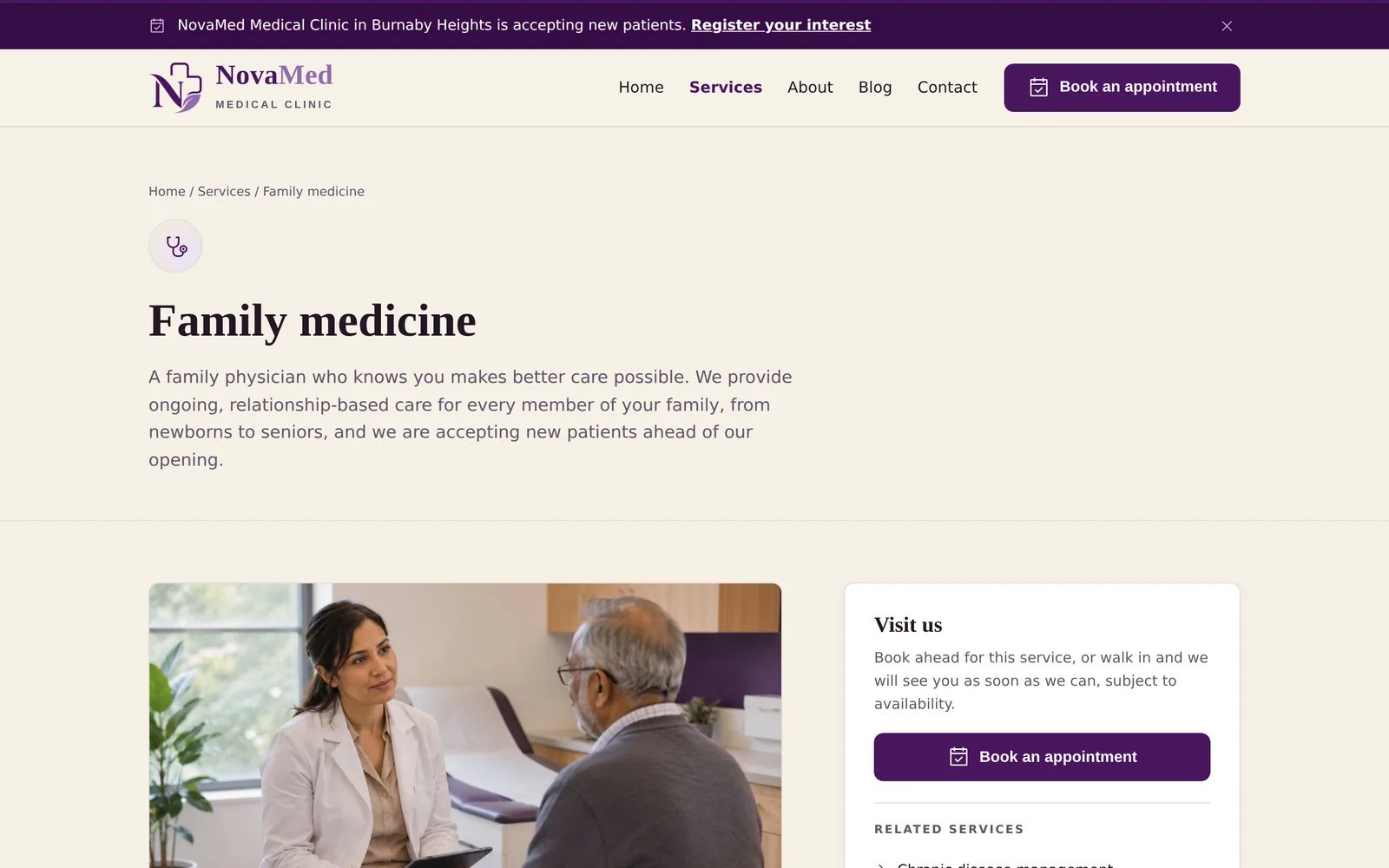
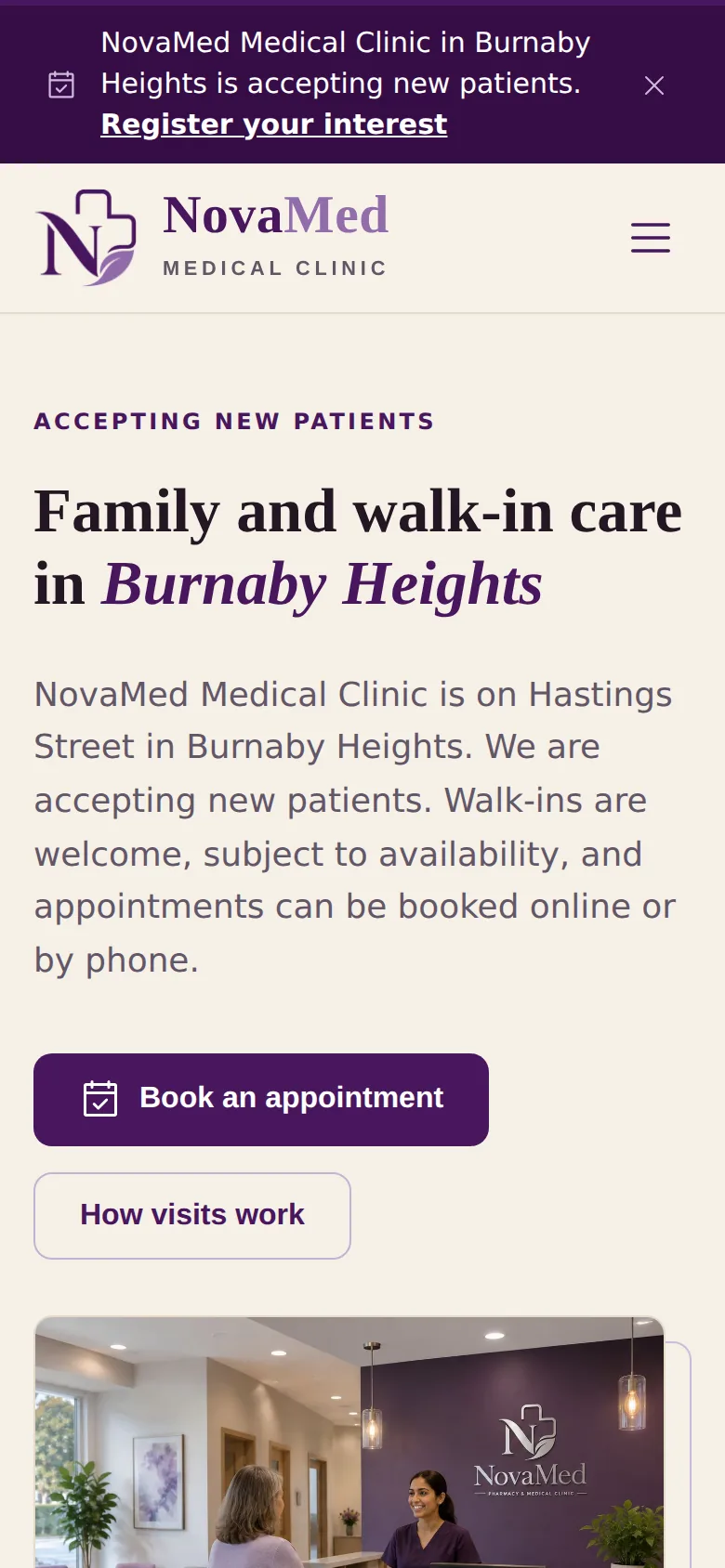
NovaMed Medical Clinic: the home page on a notebook, the family practice page on a tablet, and the phone view. The hardware is drawn in code and is an illustration; only the screens are real.
What goes wrong
The problems we see on clinic sites
- Patients cannot tell whether you are accepting new patients, or how to join the waitlist.
- Booking means phoning, and the phone is busy.
- Hours, holiday closures, and physician availability are out of date because nobody can edit the site.
- Copy that describes physicians or treatments in ways a College advertising standard would not allow.
- No structured data, so the clinic is missing from the map results patients actually use.
Regulators
Who sets the advertising rules
| Province | Regulator |
|---|---|
| British Columbia | College of Physicians and Surgeons of British Columbia (CPSBC) |
| Alberta | College of Physicians and Surgeons of Alberta (CPSA) |
| Saskatchewan | College of Physicians and Surgeons of Saskatchewan (CPSS) |
| Manitoba | College of Physicians and Surgeons of Manitoba (CPSM) |
| Ontario | College of Physicians and Surgeons of Ontario (CPSO) |
| Québec | Collège des médecins du Québec (CMQ) |
| Nova Scotia | College of Physicians and Surgeons of Nova Scotia (CPSNS) |
What we deliver
Patient tools for a clinic
New patient registration and waitlist
A clear accepting or not accepting status, a registration form that collects contact details only, and a waitlist that routes to your clinic's own system.
What we mean by thisOnline shop for what you sell
Skin care, supplements, or medical supplies on the major shop platforms, linked to your site. Product copy stays within Health Canada's claim limits and your College's standard.
What we mean by thisOnline booking through your EMR
We link to the booking tool your EMR is connected to (Ocean, Cortico, Pomelo, Medeo or the EMR's own module), rather than adding another system your staff must check.
What we mean by thisVirtual care and after hours instructions
Where to go, who to call, and how to reach virtual care, written plainly and kept current by your staff through the panel.
Physician and team pages
Credentials and areas of practice stated accurately, with the College's rules on titles and designations applied.
Service pages structured for search
One page per service (women's health, travel medicine, minor procedures, chronic disease clinics) with a clinician reviewer, credential, and date.
Pharmacy plus clinic co location
If the clinic sits beside a pharmacy, both are presented as one patient journey with separate, accurate entities for search.
Software your practice may already use
A clinic runs an EMR and, connected to it, a patient facing tool for booking, intake and messaging. EMRs certified or widely marketed in Canada include PS Suite, Med Access, the Collaborative Health Record, Accuro, OSCAR Pro, Juno, Ava, MYLE, Omnimed and Medesync. The patient tools are Ocean, Cortico, Pomelo, Medeo, Connect, MyHealthAccess and Ava Connect. The website connects to the patient tool, through the link your clinic generates, and never to the EMR itself unless the vendor grants access and the work is scoped separately.
Keep the software your team already uses. We review your booking, intake and patient portal tools before proposing the website. Your proposal identifies the connection method for each tool and any vendor requirements or additional costs.
| Software | What it does | What a patient does from your site | Website route |
|---|---|---|---|
| TELUS PS Suite TELUS Health. Clinical or practice system. | Charting, scheduling and billing. | Booking and intake through Ocean or Pomelo, where the clinic has enabled one of them. | Existing vendor connector; Link or button Connect with us to discuss your individual or enterprise needs. |
| TELUS Med Access TELUS Health. Clinical or practice system. | Charting, scheduling and billing. | Booking through the clinic's Ocean connection, where the add on is enabled. | Existing vendor connector; Link or button Connect with us to discuss your individual or enterprise needs. |
| TELUS Collaborative Health Record (also CHR, TELUS Health Connect) TELUS Health. Clinical or practice system. | Charting, booking, intake, messaging, virtual care and payments in one system. | Book through the clinic's eBooking link or the Connect patient app; a request may need confirmation by the clinic. | Link or button; Direct connection Connect with us to discuss your individual or enterprise needs. |
| Accuro EMR QHR Technologies. Clinical or practice system. | Charting, scheduling and billing. | Booking and messaging through Accuro Engage and the Medeo patient app, where enabled. | Existing vendor connector; Link or button; Direct connection Connect with us to discuss your individual or enterprise needs. |
| OSCAR Pro WELLSTAR. Clinical or practice system. | Charting, scheduling and billing. The commercial OSCAR Pro is distinct from the open source OSCAR it grew from. | Booking through Ocean, Cortico or another partner the clinic has enabled. | Existing vendor connector; Link or button Connect with us to discuss your individual or enterprise needs. |
| Juno EMR (also MyHealthAccess) WELLSTAR. Clinical or practice system. | Charting, booking, reminders and virtual care. | Book through the clinic's MyHealthAccess link. | Link or button Connect with us to discuss your individual or enterprise needs. |
| Ava EMR (also Ava Connect) Ava Industries. Clinical or practice system. | Charting, billing, booking and messaging. Alberta and British Columbia workflows are documented by the vendor. | Portal booking and messaging through Ava Connect, which the clinic opens to patients by invitation. | Link or button Connect with us to discuss your individual or enterprise needs. |
| MYLE MEDFAR. Clinical or practice system. | Charting, booking, messaging and virtual care. Quebec, with certification there, and other provinces. | Book and message through the clinic's approved MYLE patient destination. | Link or button Connect with us to discuss your individual or enterprise needs. |
| Omnimed Omnimed. Clinical or practice system. | Charting, scheduling and clinical communication. Quebec. | Book through the appointment service the clinic has connected to Omnimed. | Existing vendor connector; Link or button Connect with us to discuss your individual or enterprise needs. |
| Medesync TELUS Health. Clinical or practice system. | Charting, scheduling, RAMQ billing and virtual care. Quebec. | Book through the patient service the clinic has enabled. The staff login is never a patient destination. | Link or button Connect with us to discuss your individual or enterprise needs. |
| Ocean (also OceanMD) OceanMD. Patient facing tool. | Online booking, intake forms, reminders and messaging connected to a supported EMR. | Book from the Ocean link the clinic generates. The vendor discourages placing it in an iframe, so it is a link, not an embed. | Link or button; Existing vendor connector Connect with us to discuss your individual or enterprise needs. |
| Cortico Cortico. Patient facing tool. | Booking, intake, reminders, virtual care and payments for supported EMRs. | Book through Cortico links specific to each booking workflow. | Link or button; Existing vendor connector Connect with us to discuss your individual or enterprise needs. |
| Pomelo TELUS Health. Patient facing tool. | Patient portal, booking, intake and reminders. | Book and complete forms from the clinic's portal link. | Link or button; Existing vendor connector Connect with us to discuss your individual or enterprise needs. |
| Medeo (also Accuro Engage) QHR Technologies. Patient facing tool. | Patient app for Accuro clinics: booking, messaging and virtual visits. | Book or message from the clinic's Medeo destination. The patient app is distinct from the provider suite and from staff logins. | Link or button; Existing vendor connector Connect with us to discuss your individual or enterprise needs. |
| Veribook Amobius Group. Patient facing tool. | Online booking connected to OSCAR EMR, with the booking written into the OSCAR schedule. | Book through the clinic's Veribook booking page, or through the booking form embedded in your site with the head and body snippets Veribook supplies. Veribook has no public API. | Link or button; Vendor supported embed Connect with us to discuss your individual or enterprise needs. |
How a website connects to clinic software
Most practices run two layers of software. The clinical system holds the record, the schedule and the billing. The patient facing tool is what a patient touches: booking, a refill request, an intake form or a portal. A website connects to the second layer, through whatever the vendor supports, and never replaces the first.
| Route | What it means | Confirmed at proposal |
|---|---|---|
| Link or button | The website sends the patient to the booking page, refill tool, intake form or portal the vendor already hosts. Works with any tool that has a public address, and with the button code some vendors generate. | The address your practice approves for patients, and any rule about new or existing patients. |
| Vendor supported embed | The vendor's own booking or intake component runs inside your page, so the patient does not leave your site. Only where the vendor documents an embed, and only when it works with a keyboard and on a phone, with a plain link as the fallback. | The vendor's current embed documentation, the module enabled on your account, and a test on a phone. |
| Existing vendor connector | Your clinical system already connects to a patient tool (an EMR to Ocean, a practice system to an exercise platform). The website links to that tool; the connection between the two systems is the vendor's, not ours. | The exact product, edition and module on each side, what the connector is permitted to do, and your vendor's confirmation. |
| Routed request | A form Monograph builds sends a refill, transfer, intake or registration request into your own system or a Canadian hosted intake tool, not to a shared inbox and never by plain email. A clinician at your practice still reviews every request. Available in Signature and Platform builds. | The destination your team will work from, who owns it, and where it stores what it receives. |
| Direct connection | New, authenticated data exchange between the website and your system through the vendor's own interface. Only where the vendor grants access, and always scoped, quoted and tested separately before patients use it. | Vendor access or approval, a suitable contract, the defined data flow, a test environment, and who maintains it. |
Compliance
What the review covers for physicians
- Physician names, titles, and specialties are stated as the College permits, with no implied specialty that is not recognized.
- No patient testimonials where the College's advertising standard prohibits them, and no claims of superiority, guaranteed results, or comparisons with named competitors.
- Uninsured services and fees are described accurately and in line with provincial rules on block fees and third party billing.
- Registration and intake forms collect contact details only and route to your system; no health information travels by plain email.
- Privacy policy matches the forms and analytics actually in use, under PIPEDA and your province's health privacy law.
The full compliance register and the plain language advertising rules guide.
Pricing
The same three services
Build from $2,500
A website built to a clinical standard, from the starter template every Monograph site is built on.
Care $150 to $250 per month
Hosting, updates, monitoring, content changes, and a quarterly compliance re review.
Growth from $500 per month
An SEO and AI search program that is executed every month, not just planned.
Questions from physicians
Do you build websites for medical clinics across Canada?
Yes. Monograph designs and maintains websites for medical clinics across Canada, from Vancouver. Your copy is written to the advertising standard of your regulatory College and your province, the regulator for your province is confirmed at each review, and your booking and intake forms connect to the systems your clinic already runs.
Can patients book directly through the site?
Yes, through the booking tool your EMR or booking vendor already provides. We link to it, or embed it where the vendor supports an embed, so your staff keep one system. Where a clinic has no booking tool, we say so and recommend one rather than building a parallel system.
Does the site collect any patient health information?
It does not ask for any. Forms collect contact details and a free text message, and the message field asks patients not to include health details. A patient can still type them, so every submission is routed into your own system or a Canadian hosted intake tool, never by plain email, and the destination, who owns it and where it stores what it receives are named in your proposal. Personal health information never travelling by plain email is one of the twelve commitments in the Monograph Standard.
We share a building with a pharmacy. Can one site cover both?
Yes, and we have delivered exactly that for the group's own practices. Each entity is described accurately for search, and the patient sees one clear path.
We run PS Suite, Med Access, Accuro or OSCAR Pro. What does the website connect to?
To the patient tool your EMR is connected to, not to the EMR itself. For PS Suite and Med Access that is usually Ocean or Pomelo; for Accuro it is Accuro Engage and the Medeo app; for OSCAR Pro it is Ocean, Cortico or another partner the clinic has enabled; for the Collaborative Health Record it is eBooking or the Connect app. The site carries the link your clinic generates. We do not write into your EMR unless the vendor grants access and the work is scoped and quoted separately.
Is an online booking confirmed, or is it a request?
It depends on your tool and its settings. Ocean and most EMR booking modules can confirm a slot at once; the Collaborative Health Record and some portals can hold a request until your staff confirm it. The button on your site says which, so a patient never leaves thinking they have an appointment when they have asked for one.
Where do intake forms and uploaded documents go?
Into the intake tool or portal your clinic already runs (Ocean, Cortico, Pomelo or your EMR's own forms), or into a Canadian hosted intake tool we set up for you. Not into a shared mailbox. The proposal names the destination, who owns the account and where it stores what it receives, and your staff work from that one place.
Who fixes a broken booking link or a failed form?
We do, under Care, for everything on the website: the button, the link, the form and its routing. A problem inside the booking tool or the EMR is the vendor's, and we raise it with them on your behalf with what we have already checked. Booking is tested on a phone before launch and re checked at each quarterly review.
Start with a call, or a free review of your current site
Send us your website address and the free ten point check scores it in seconds. If yours passes, we will say so.